As per the described ideals in intro and wider context, CI jobs should ideally execute in an ephemeral, deterministic environment. But without caching it is going to be sub-optimal. Because each execution is ephemeral it would have to pull down all the dependencies, and do the same busy work every time. Some ecosystems require GBs of dependencies to run a build. Obviously this is where caching comes in, we want to do the busy work once and re-use it. We want to re-use it as cheaply and quickly as possible, but there is some interesting, non-obvious details to get right for the best results.
Note: There are also some non-obvious intangibles at play here too, re-using cached dependencies is ‘faster’ but by avoid a yarn install and the download of 200k tiny files we are likely significantly reducing the IO of the CI Job, and unlike memory and CPU usage, IO is much harder to throttle or limit on shared build infrastructure, and subsequently often a bottleneck. So saving tons of IOPS can mean not just this job but other neighbour jobs are faster too.
For tl;dr, skip to section 3.
Sections
- Standard approaches
- A Test Project and results
- New approach, mount a filesystem
- How to do it yourself
Standard approaches
There is really just 1 dominate approach to re-using cached files in CI systems today, approach number. But for more context, some of the standard caching approaches are:
-
No caching: Download / do expensive thing every time, slowest and least deterministic. Works fine for small projects that run infrequently, why bother with the extra config/complexity to save 1 minute every month? 🤷♂
-
Shared disk: Store frequently used files on a shared disk or network filesystem between CI jobs, less favoured now but used to be common. Breaks independence and promotes side-effects which is bad. Depending on how its implemented can result in poor IO (like if using AWS EFS), slowing down cache usage even when you get hits.
-
Archive from object store (S3 etc): Store previously used cache files in an archive remotely and pull it down on CI job start, unpack the files into their original location and use in the new job. This is how basically all cloud CI systems work (GitHub Actions, GitLab CI, CircleCI etc). It achieves great flexibility and saves time whilst achieving our ephemeral, independent and deterministic properties. But it takes time, sometimes a lot of time, we can do better.
-
Bake into build container: Similar properties to remote archive but more fragile and less flexible, will get fewer cache hits and will increase the amount of time it takes to pull the build container image (image pulls are slooow compared to curl - https://github.com/containerd/containerd/issues/2886). Also the combinatorial explosion of different image variants is hard to manage, it is lower complexity to split the orthogonal concepts of build containers vs caches.
Digging into common approach 3 more, where is the time spent? and how can it be improved? This is something people complain about on the internet:
https://gitlab.com/gitlab-org/gitlab-runner/-/issues/1797
https://gitlab.com/gitlab-org/gitlab/-/issues/211375
https://www.reddit.com/r/devops/comments/fnhzux/best_practice_to_use_cache_for_gitlab_ci/
So lets test some slightly different approaches on GitLab and GitHub public Linux runners.
A Test Project and results
To get some hard data, I setup a job to exercise a few different variants of approach 3 for a test project, cypress-realworld-app, https://github.com/cypress-io/cypress-realworld-app.
Assuming the following:
- Cache archive is stored in local-ish S3 region
- Cache archive contains just the
node_modulesfrom test project. Archive was 250MB-500MB in my tests depending on compression. - Files must all exist before the build can start, its blocking.
Scenarios:
- Zip archive
- Streamed ZSTD tar archive
- Streamed LZ4 tar archive
- SquashFS image with ZSTD compression (userland unpack)
- Use the OOTB caching provided by GitLab/GitHub
Potential handbrakes:
Downloading cache from s3
- Download should be pretty quick, top end of S3 multi-part downloads via S3 CLI is around 200MB/s. Still takes some time, and the larger the cache the longer it will take.
- AWS CLI does a few API calls before actually starting S3 GetObject, metadata api, STS calls etc, these can take seconds to timeout etc depending where it is being run. Dumb HTTP client would be faster and simpler but would need to auth somehow.
Decompressing cache
- Expect decompression to be quite fast, it unlikely to be a bottleneck vs download or unpack. totally depends on available bytes, available CPU and algorithm however.
- Obvious algorithm choices are LZ4 and ZSTD, in theory LZ4 should decompress faster, but ZSTD compresses better so less bytes to handle.
- Existing algorithm benchmarks here: http://facebook.github.io/zstd/
- Some cached files are already compressed, like JARs, so compression isn’t that effective. Will be very effective for JS though.
Unpacking files
- Depends on the number of files being created. Few big files will be faster than many small files.
- inode creation can become a bottleneck for lots of small files (looking at you node_modules).
- Tar is streamable format, but that means it can’t be parallelised, it can only unpack one file at a time. Normally this is OK as it is IO bound, but if you have many small files the relative overhead of handling each file goes up, creating a sub-optimal solution.
Note: Depending on approach/scenario sometimes 2 and 3 are combined, like in ZIP archives or squashfs.
Results summary
For our test project the node_modules directory has 188k~ files in it and unpacked is 1.8GB. Creating all these tiny files becomes the most work, download and decompress are fast in comparison.
Because of all these tiny files, best results are found where the file creation happens as early as possible, so a streamed tar archive (where bytes are decompressed and unpacked as they are downloaded) beats the download then decompress/unpack variants.
| Scenario | Archive size | Github Unpack time | Gitlab Unpack time |
|---|---|---|---|
| Zip | 675MB | 28 secs | 41 secs |
| Tar+LZ4 | 514MB | 13 secs | 28 secs |
| Tar+ZSTD | 294MB | 10 secs | 22 secs |
| squashfs | 222MB | 10 secs | 26 secs |
| OOTB CI | unknown | 15 secs | 38 secs |
Results detail
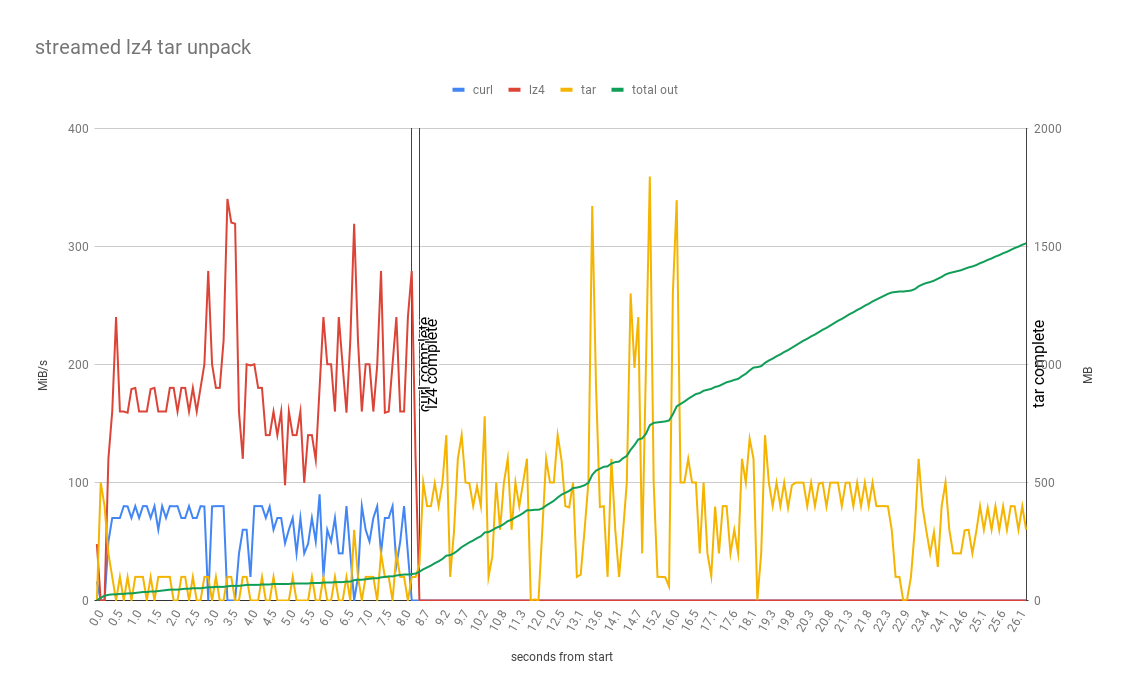
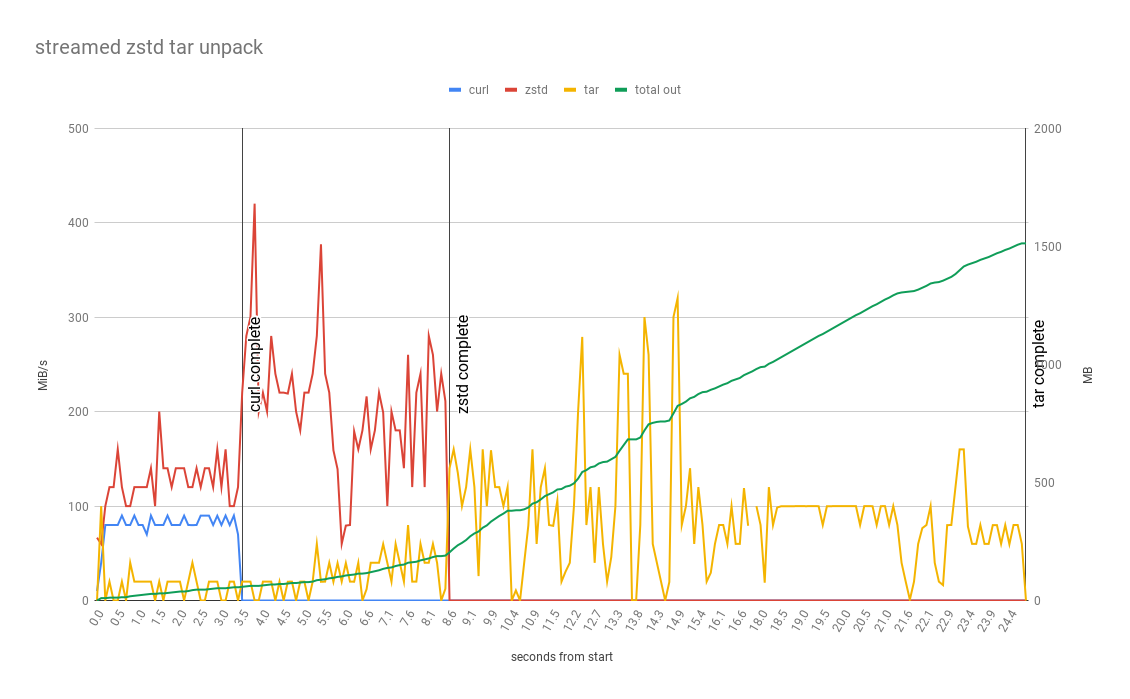
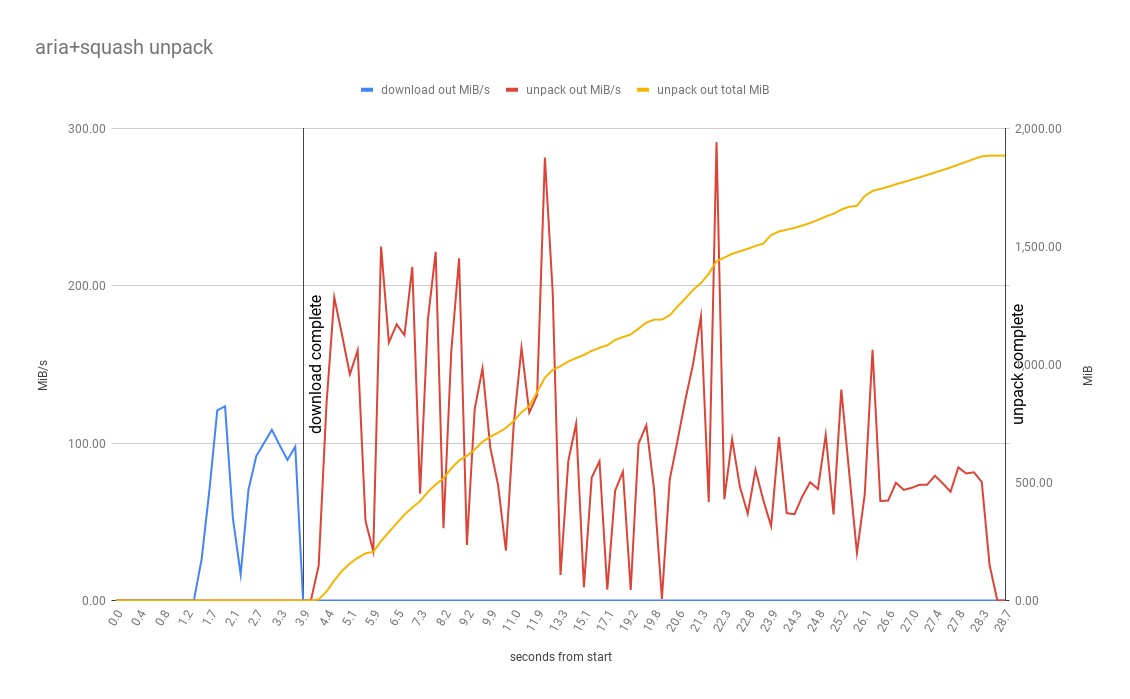
These results are just for executions on GitLab, GitHub isn’t shown. The graphs are showing the MiB/s being processed for each step in the variant as well as the total MiB written in the final unpacked location. It is interesting to see the ‘download then process’ vs the ‘process as stream’ and which part of the process is really taking all the time.
Note: Collecting this data was quite interesting, so I wrote up how I did it, mostly so I don’t forget. Here: Data collection for CI Caching
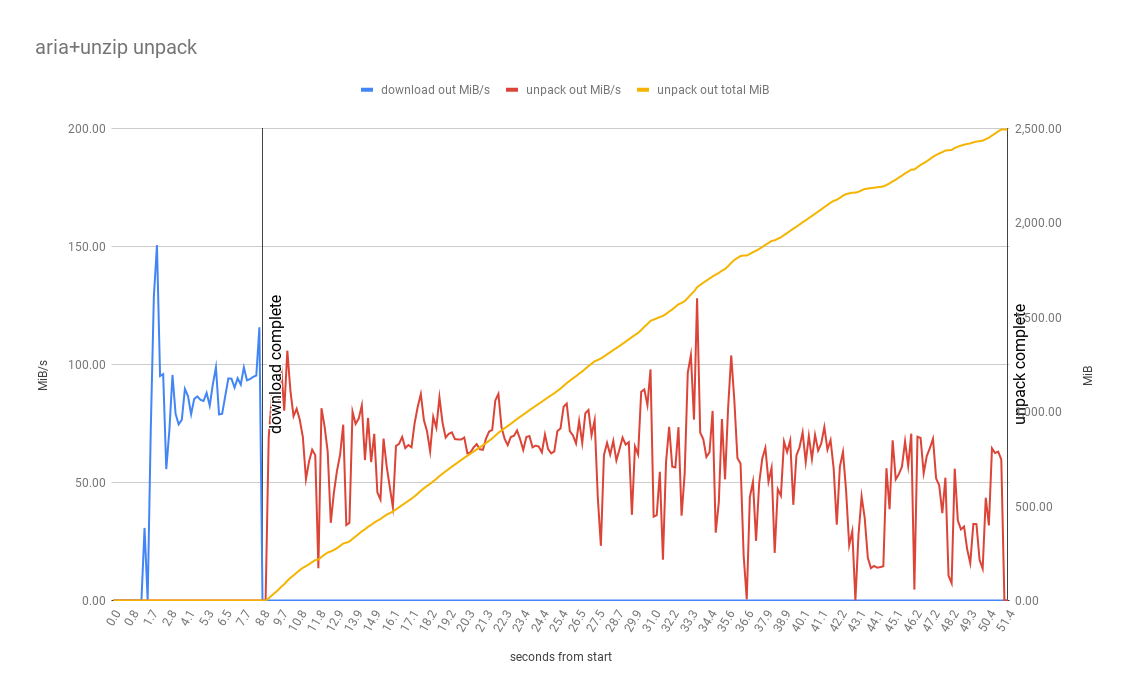
Zip
This variant has the largest archive size at 675MB, so download phase should take the longest. A standard zip file isn’t streamable like a tar either so processing can’t happen until the file is entirely downloaded. It makes sense that it has the worst results.
Tar+LZ4
LZ4 has the best decompression performance benchmarks, so in theory it should be a good choice. In our test project the compressed LZ4 file is roughly 2x larger than the same ZSTD file, so more to download even if decompression is faster. As per the graph decompression takes 8.7 seconds, basically the same as the ZSTD variant.
Tar+ZSTD
Very similar to LZ4, but ZSTD compresses better 294MB vs 514MB, so less to download which is an advantage. But as per the decompression benchmark LZ4 decompresses faster (4530 MB/ vs 1660 MB/s) so the extra time to download could be offset by faster time to decompress. This is what we see in the results as per the graph, decompression completes at 8.6 seconds only 0.1 seconds faster than the LZ4 variant.
SquashFS
This is a non-streamable format, like Zip, so decompression/unpacking must wait for the download to complete before it starts. Even with the smallest archive size (222MB) and the other positives of squashfs we can see as per the data that not being able to start unpacking early means the overall time to complete is slightly higher than TAR+LZ4 and TAR+ZSTD. In a project with fewer larger files (like .gradle) this would likely be faster.
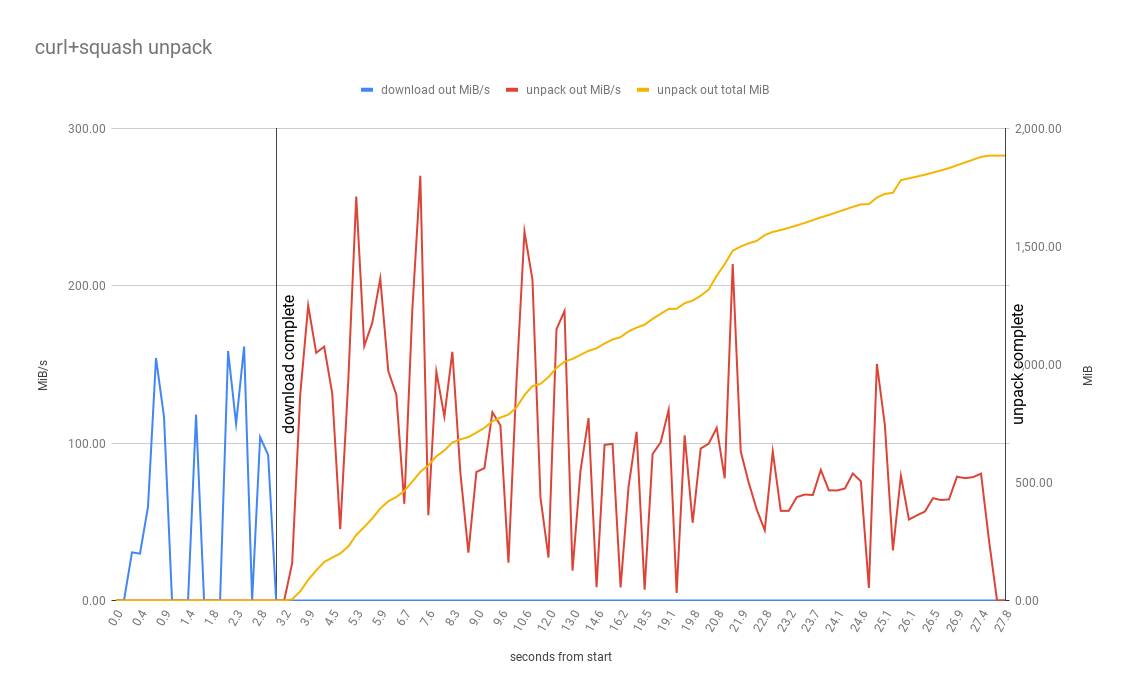
OOTB CI
N/A, can’t measure it.
Findings
- Zip fails after an average unpack time of 28/41 seconds with archive size of 675MB. because zips don’t support symlink properly and parts of NPM / node_modules make use of symlinks in node_modules directory that is zipped and then unzipped without re-linking or similar won’t be usable. So Zip is not an acceptable general format for general caching. It also isn’t streamable and doesn’t compress as well as ZSTD/LZ4, so has no advantages and is a bad choice.
- I thought aria2 would be faster, because s3 type stores like concurrency, single stream downloads are often slower than multi-stream, but it seems the overhead of setting up the current connections/TLS handshakes possibly is greater than the benefit realised, at least for the file sizes being tested here (<1GB). So curl it is!.
- GitHub is consistently twice+ as fast as GitLab in unpacking lots of small files, the GitHub OOTB public runners must have better IO/disks? not sure why.
- Decompression is rarely the bottleneck, optimise for network bandwidth/latency and IO over decompression speed, so generally ZSTD will trump LZ4.
- Zip /squashfs can’t be streamed so delays the start of the slowest phase of creating all the files. Slower the network, the higher the impact of not streaming.
Inefficiencies
Even with the above optimised setup, with full streaming concurrency there is still waste:
- We are decompressing every files in the cache before use, even if we don’t need it.
- We are unpacking every file in the cached archive before use, even if not used.
- We are downloading cache from remote S3 for each job (minor cost, 2ish seconds depending on size).
So by using a TAR archive with ZSTD compression we can concurrently download our cache and unpack it into place for our CI job to run, but even with in the fastest scenario it takes 30 seconds for our test project, quite a while, especially when we don’t even know if we need all those cache files yet. The alternative in the test project node_modules case is a 10+ minute yarn install which downloads everything fresh, so 30 seconds is great in comparison but how do we go faster? How can we avoid unpacking and creating all these tiny files every time?
New approach, mount a filesystem
Given the execution environment our CI job is running in is linux and has kernel support for squashfs and overlay filesystem, we can achieve this with mount, using squashfs and overlay filesystems. In retrospect this is obvious, in linux if I want to access a group of files in an image I mount the filesystem, my build container is already running in an overlay filesystem (probably) so i’m already using most of the moving parts required here.
squashfs is a great fit here as it supports file level compression and de-duplication (as well as symlinks, xattrs and most/all of the other linux filesystem properties) out of the box and creating an image happens in userspace. By mounting a squashfs image as the base of our cache we are moving the unpack time to cache creation rather than cache use time unlike in the tar example. Mounting a local squashfs image into a path in linux is essentially free it takes milliseconds avoiding in our test project the 30 seconds of node_modules unpacking and all the IOPS.
But a mounted squashfs image is read-only to make changes a new image needs to be built. This is where the overlay filesystem comes in, a common pattern in linux and especially with squashfs. To make it writable we use a union filesystem, in our case overlay mounted filesystem, where the squashfs mount is the lowerdir and an empty temp dir is the upperdir. With this in place we can cheaply mount our squashfs image at a known state, and then the CI job can read/write as much as it likes via the overlay mount. Setting all this up is again very quick to run, taking milliseconds.
Mount via normal overlay / squashfs commands:
mkdir -p /node_modules_ro
mkdir -p /node_modules_upper
mkdir -p /node_modules_work
sudo mount -t squashfs -o loop,ro /node_modules.squashfs /node_modules_ro
mkdir -p ./node_modules/
sudo mount -t overlay overlay2 -o lowerdir=/node_modules_ro,upperdir=/node_modules_upper,workdir=/node_modules_work ./node_modules
This entirely removes the ‘decompress’ and ‘unpack’ phases of making a cache available, so were just left with the time taken to download the file from our store, 1-2 seconds.
Problems mounting
Mounting filesystems inside a container requires privileges equivalent to docker run --privileged .. which might create potential security problems and constrains where this solution is applicable. This is solvable by moving the execution of mounting outside the CI job itself and having the job declare what it wants attached and where and have another trusted process do that work for it. In Kubernetes this could be achieved via a CSI driver and is something I’m considering building out to make this process easier to deploy more widely (and still safely). There is nothing inherently insecure about mounting squashfs images, your CI job has the ability to create files anyway, so it is really about just finding a way to not have to the running build container privileges.
Also as this requires essentially root access (with privileges), depending on the service it isn’t workable on all cloud CI services. Depending how these services isolate different jobs and what levels of permissions the running job is given some will be able to mount and some won’t. For those that don’t give the necessary privileges there doesn’t seem to be any reason why the CI services themselves couldn’t build and offer this as the out of the box way caching is done on Linux. All cloud CI services have some way to cache files across job runs (and most of them aren’t very fast).
Another constraint is the need for overlay and squashfs filesystem support in the kernel, I thought that mount privileges would be the problem, but GitLab public runner can’t be used not because of privileges but because of kernel support for squashfs 🤦♂in GCP CooS.
Extra speed, if you control your own runners
The final piece is to avoid the S3 download and reduce wait time to <1 seconds is by stashing the named and versioned squashfs images in a shared location on the shared runner host, so instead of always pulling from remote they can be quickly re-used across jobs. Since these files are read-only images they can be treated as immutable and thus sharing them across jobs doesn’t break our ‘no side effects’ rule.
How to do it yourself
Example/testing repos are here: